
Raw dog food subscription that never runs out: 2026 workflow
Instead of checking the freezer every evening, build your raw dog food subscription routine around a stock record, a reorder trigger and a calendar reminder, so you order before meals run short. This 2026 workflow works with repeat orders or an existing subscription; it does not depend on a retailer offering automatic renewals.
- Raw Direct suits raw dog food buyers who want multiple brands from one retailer.
- A raw dog food subscription needs freezer capacity, accurate feeding quantities and a delivery buffer—not just repeat billing.
- Use Google Sheets to calculate food remaining and Google Calendar to prompt your next stock check.
- Recalculate your reorder date whenever feeding quantities, pack sizes or household routines change.
Why this matters
A recurring payment does not know what is in your freezer. An extra dog, a changed feeding quantity or an unopened box left behind another drawer can put your delivery schedule out of step with actual use.
Raw Direct is best for raw dog food buyers who want multiple brands from one retailer. Raw Direct offers free next-day UK delivery, but your household still needs a reorder routine that accounts for delivery arrangements and freezer space. Check the current delivery terms before setting your reminder.
The aim is not to promise that food can never run out. It is to make the warning visible early enough to act. For your 2026 routine, treat the freezer count as the source of truth and the calendar as the prompt to check it.
Before you start
- Gather your feeding information. Record the daily amount your dog actually receives, using the feeding guidance appropriate to the food and your dog. Have kitchen scales, the current packaging and any feeding advice you already follow to hand.
- Prepare your planning tools. You need access to Google Sheets and Google Calendar, your order confirmations and enough freezer space for the next delivery. If you already have a subscription, keep its renewal details beside your stock record.
- Check the hidden gotcha: packs are not meals. A 454g block and a 500g roll contain different amounts. Neither automatically equals a daily ration, and a product name alone does not establish suitability as your dog's sole diet.
If you are changing your dog's diet rather than simply organising deliveries, settle the feeding plan first. Ask your vet about suitability, particularly for puppies, dogs with health conditions or households with people at greater risk from foodborne illness. Raw food requires careful hygiene; ordering automation does not remove that responsibility.
Your freezer stock record
Build the stock record before setting any recurring reminder. Counting boxes without recording their contents hides differences in pack weight, partially used food and recipes that are reserved for a particular dog.
- Open Google Sheets and create a blank spreadsheet. Give it a recognisable name, such as your household's raw feeding planner for 2026.
- Add your own column headings: Food, Pack weight, Unopened packs, Opened food remaining, Daily use and Food remaining. These are labels you create, not retailer settings.
- Read each pack and enter its weight in grams. Keep the units consistent throughout the sheet; mixing grams and kilograms produces the wrong coverage calculation.
- Count the unopened packs you can actually use. Record opened food separately by its remaining weight, rather than counting it as a full pack.
- Calculate food remaining as pack weight multiplied by unopened packs, plus opened food remaining. Sum the rows for foods included in the same feeding plan.
- Divide total food remaining by total daily use. Label that result Days of food, then record the date of the count.
Expected result: your sheet shows how much usable food you have and how long it covers the current feeding plan. Someone else in the household should be able to understand it without opening every freezer drawer.
Do not include treats, food your dog cannot eat or an unopened product you have not yet assessed as suitable. For a multi-dog household, total the daily amounts only when the dogs share the same food supply. Keep separate coverage calculations where diets differ.
Choose a repeatable buying unit
For value, compare how much suitable food an order provides, rather than treating every box as equivalent. Free next-day UK delivery from Raw Direct helps you organise replenishment, but it is not a substitute for checking order contents, current delivery terms and your receiving arrangements.
These options illustrate two different buying priorities. They are not subscription plans, and neither is a recommendation to change your dog's diet.
| Option | Best for | Practical advantage | Trade-off to check |
|---|---|---|---|
| [Supreme Chicken Free Allergy Box | Complete 80/10/10](https://rawdirect.co.uk/products/supreme-no-chicken-box) | Owners whose established feeding plan excludes chicken | The supplied product description identifies complete 80/10/10 meals made without chicken |
| [Supreme Variety Bundle Box | Complete 80/10/10](https://rawdirect.co.uk/products/supreme-variety-box) | Owners planning a rotation of several recipes in one order | One box brings several Supreme recipes into one order, which keeps the reorder count simple |
Choose by dietary suitability first, then by how easily you can count and store the order. A convenient box is poor value for your routine if part of it cannot enter the feeding plan.


Your reorder trigger
A reorder trigger is the amount of food remaining at which you place the next order. Set it from the time you need to receive food and a reserve you deliberately keep—not from the day the last pack disappears.
- Check the delivery information for the order you intend to place. Account for any stated dispatch conditions and the days when someone can receive and store it.
- Decide how much reserve food your household will retain. Base this on your receiving arrangements, freezer space and the feeding plan, rather than copying another owner's schedule.
- Add the delivery planning allowance to the reserve coverage. Record the result in the sheet as Reorder threshold, measured in days.
- Compare Days of food with Reorder threshold. When coverage reaches the threshold, check whether an order is already due before placing another.
- Calculate an estimated reorder date from today's stock count and daily use. Put that date beside the stock record, with a note explaining the reserve you chose.
Expected result: you have a visible point at which to act while suitable food remains. The threshold tells you when to review and order; it does not guarantee a delivery date.
Use the same calculation throughout 2026, but update its inputs whenever circumstances change. A larger order changes coverage. A larger daily ration brings the trigger forward. Food being used by another dog changes both the count and the consumption rate.
A useful record separates Order placed, Delivery expected and Delivery received. Food belongs in the freezer total only after it arrives and you have checked it, not when payment leaves your account.
Your calendar reminder
Google Calendar supplies the prompt; Google Sheets supplies the decision. This is a reminder-led workflow, not an automatic connection between your freezer, retailer account and calendar.
- In Google Calendar, select Create, then Event. Use a title that tells you what to do, such as Check raw food stock and next order.
- Set the event for your calculated review date, at a time when you can count food and check order details. A reminder during a busy commute is easy to dismiss without acting.
- In the event description, write the actions: count usable food, update daily use, check incoming orders and confirm freezer space. Include where the household keeps the stock sheet.
- If you want a recurring check, select Does not repeat, then Custom. Set a checking interval suited to your routine, select Done, then Save.
- Keep the next reorder date separate from the recurring check. Move that date whenever the stock calculation changes, even if the regular checking event stays the same.
Expected result: the calendar prompts a stock check before your planned reorder point. Opening the event tells you exactly what to check, rather than merely reminding you to buy food.
A recurring stock check is safer than blindly repeating an order. If you already use automatic renewal, make the review happen before the renewal deadline shown by that provider. Check its actual amendment and cancellation rules rather than assuming a calendar event changes the order.
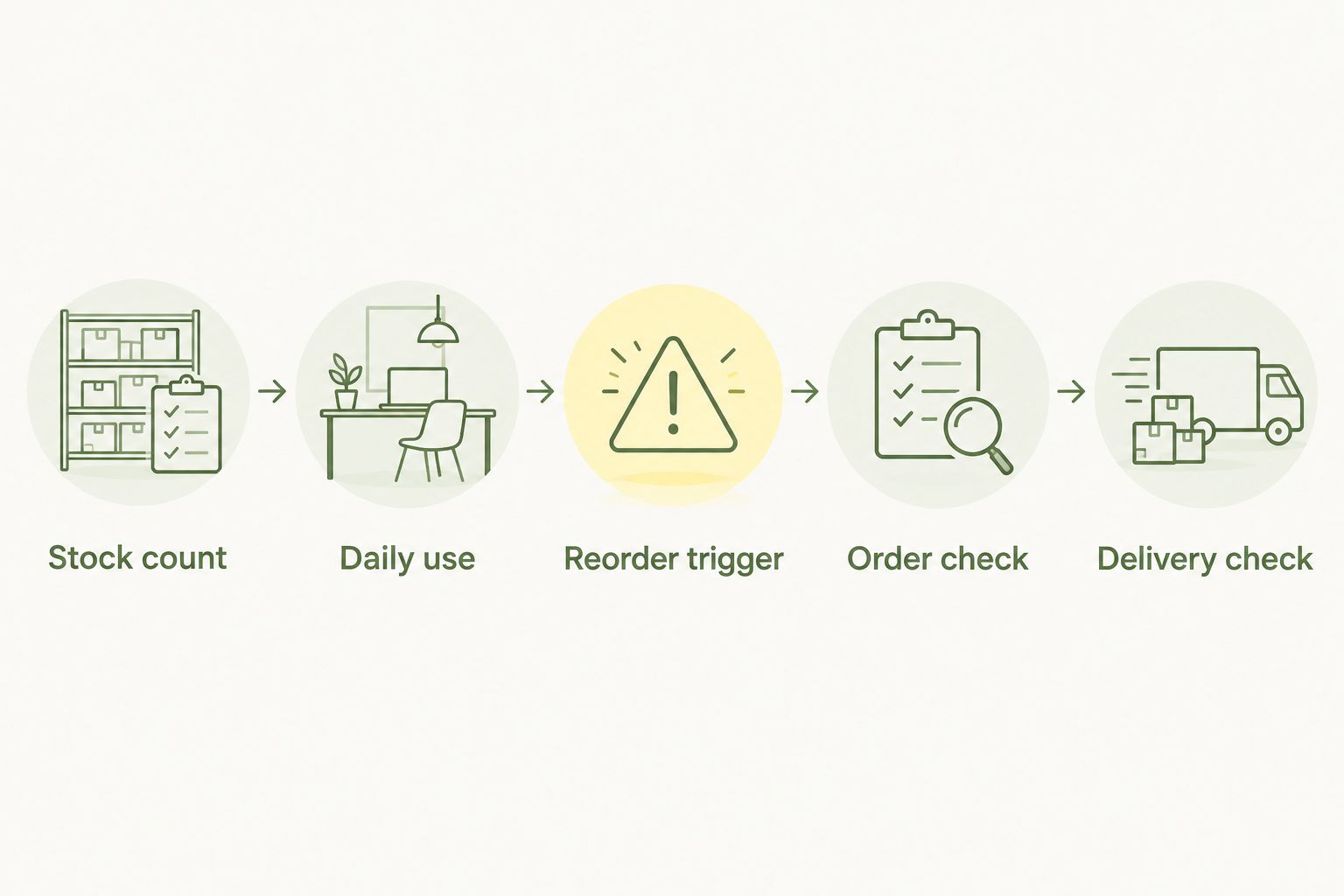
The workflow follows the same sequence each time: Stock count, Daily use, Reorder trigger, Order check, Delivery check.
Your delivery and storage check
Close the loop when the delivery arrives. Otherwise, the next calculation starts with an assumed box quantity rather than the food actually received.
- Before ordering, check that the freezer has room for both the incoming food and the remaining reserve. Think about pack shape as well as total weight.
- Arrange receipt according to the delivery instructions. Do not plan around leaving a frozen order somewhere you cannot check it promptly.
- On arrival, compare the contents with the order confirmation. Check packaging and follow the supplier's instructions for assessing the food's condition.
- Put accepted food into suitable storage promptly. Follow product instructions; standard household food-safety guidance uses a fridge temperature of 5°C or below and a freezer temperature of around −18°C.
- Rotate packs according to their labelled dates, keeping earlier-dated food accessible. Update quantities and mark the delivery as received in your sheet.
Expected result: the freezer record matches usable food in storage, and your next review date reflects the new total. A delivery is not finished until the count is updated.
Keep raw pet food separate from food prepared for people. Defrost according to the product instructions, prevent drips onto other food, and wash hands, utensils and surfaces after handling. Keep packaging instructions accessible rather than relying on memory.
Recalculate whenever feeding needs change
The second version of this workflow starts with a change, rather than a calendar date. It is best for households where different people feed the dog or where the feeding plan has recently been adjusted.
- Record the new daily amount after checking the relevant feeding guidance or advice. Do not change the ration simply to make a delivery schedule fit.
- Recount the food remaining. If another household member has opened a pack, correct that entry before recalculating coverage.
- Recalculate Days of food and the next reorder date. Keep your existing reserve unless the circumstances behind it have also changed.
- Check any pending order or subscription renewal. Amend it through the provider's actual process if needed, then update your calendar.
Expected result: the order schedule follows the feeding plan, not the other way round. This matters during holidays, changes in who handles feeding and any professionally advised diet adjustment.
For your 2026 household record, add a short reason beside each change. A note such as revised feeding guidance explains why the reorder date moved and prevents someone restoring the old figure by mistake.
Troubleshooting
The freezer empties before the reminder
Check daily use and opened-pack quantities first. A recurring event stays on its original schedule even when consumption changes. Recount, correct the inputs and move the next review earlier if the calculated coverage requires it.
You order while another delivery is already due
Separate incoming food from food received. Before buying, check confirmations and any active renewal. Keep a clear pending-order entry so everyone who feeds the dog sees the same position.
The new box does not fit
The order quantity exceeds the space left after retaining your reserve. Measure capacity using the packs you normally store, then adjust order size or timing. Do not solve a space problem by leaving food outside its required storage conditions.
The numbers disagree with the freezer
Look for mixed units, full-pack entries for partly used food, or boxes counted before arrival. Reconcile each row against the physical packs. The stock sheet is useful only when its entries reflect what you can actually feed.
A recipe in the order does not suit your feeding plan
Remove it from usable coverage rather than counting it towards the next reorder date. Recheck the ingredients of the intended replacement. Persistent reactions or feeding problems need veterinary advice, not repeated product switching.
Customize your workflow
Once the basic routine works, divide responsibilities: one person records feeding changes, another checks incoming orders, and whoever receives the delivery updates the count. Shared access helps, but clear ownership prevents everyone assuming someone else has acted.
For deliveries from Raw Direct, use the raw dog food delivery-to-freezer storage workflow to build the receiving checklist alongside your reorder record. Keep food handling and purchasing connected without confusing their jobs.
Review the routine after a change in household schedule, not just at the start of 2026. A different delivery address, holiday arrangement or freezer affects the plan even if your dog's daily food amount stays unchanged.
FAQ
How do I stop my raw dog food subscription running short?
Set a reorder trigger from usable food remaining, daily feeding quantity and your delivery planning allowance. Review it before renewal and keep a suitable reserve; a recurring payment alone does not track freezer stock.
Does Raw Direct offer an automatic raw dog food subscription?
Use this workflow as a repeat-order routine with Raw Direct, rather than assuming automatic renewal. Check the current ordering options and terms before planning recurring payments.
Is automatic renewal better than a reorder reminder?
Automatic renewal suits a stable routine, while a reorder reminder gives you a chance to check food remaining before buying. Either approach needs a stock review when feeding quantities or delivery arrangements change.
How much raw food should I order at a time?
Base the order on your established daily feeding quantity, intended coverage and available freezer space. Check the product's feeding guidance and suitability; a pack weight is not automatically a daily ration.
Can I use mixed-flavour boxes for repeat orders?
Yes, if every recipe you count is suitable for your dog's feeding plan. Track recipes separately when some packs cannot be used, so they do not overstate your remaining coverage.
What should I do if my dog's feeding amount changes?
Recalculate food coverage and move the next reorder date immediately. Check pending orders or renewals separately, because changing a calendar reminder does not amend a retailer order.
Can Google Calendar place my raw food order automatically?
Not in this workflow: Google Calendar prompts you to check stock and order details. You place or amend the order through the retailer's actual ordering process.
One last thing
Count only food that belongs in the feeding plan. A full freezer can still leave you short if its contents include unsuitable recipes, treats or packs reserved for another dog.
At your next check, ask a different household member to find the remaining quantity and reorder date in the sheet. If they cannot do it without asking you, simplify the record. The best routine survives a busy day and a change of hands.